SeatGeek Credit is a balance connected to your SeatGeek account that you can use toward future eligible purchases. You can use all or part of your balance and keep any unused amount for another order. You just choose how much to apply at checkout, and save the rest for later.
Note:
Available for Android and iOS; for Android you must be on versions greater than or equal to 2026.30.0; and on iOS you must be on versions greater than or equal to 2026.31.0.
How can I buy tickets my SeatGeek Credit?
- Choose eligible tickets and continue to the Review Order page.
- Look for SeatGeek Credit below your payment method. When available, the option is turned on by default.
- Use the full available balance, or select Edit to enter a smaller amount.
- Review the amount applied and any balance that will remain, then complete your purchase.
If your credit does not cover the full order, you can pay the remaining eligible amount with a supported payment method. You may also use an eligible promo code on the same purchase.
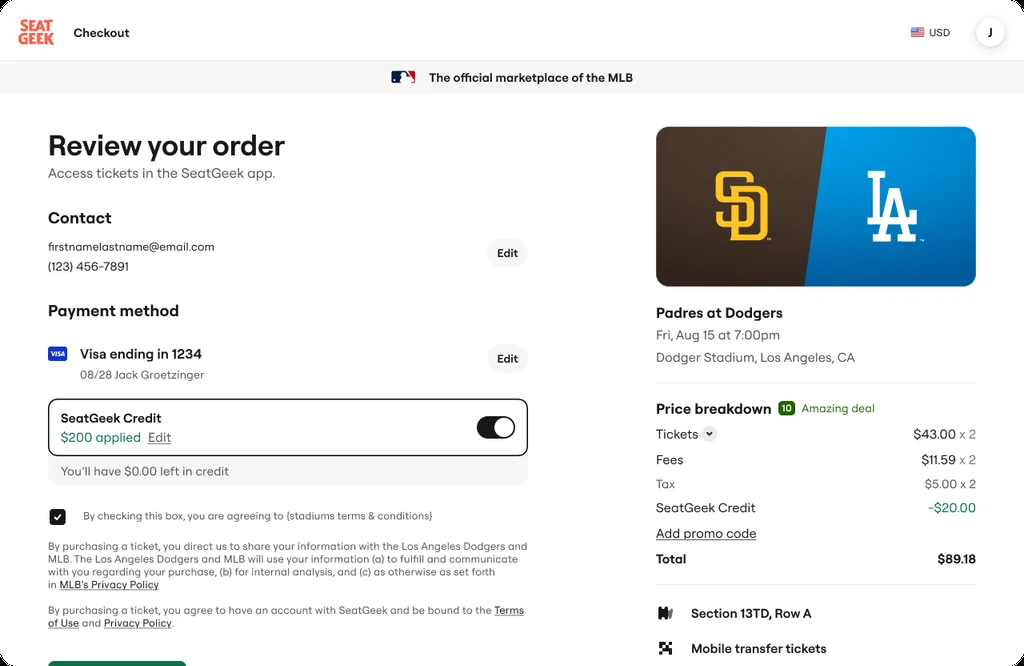
When available, SeatGeek Credit appears below your payment method and shows the amount applied.
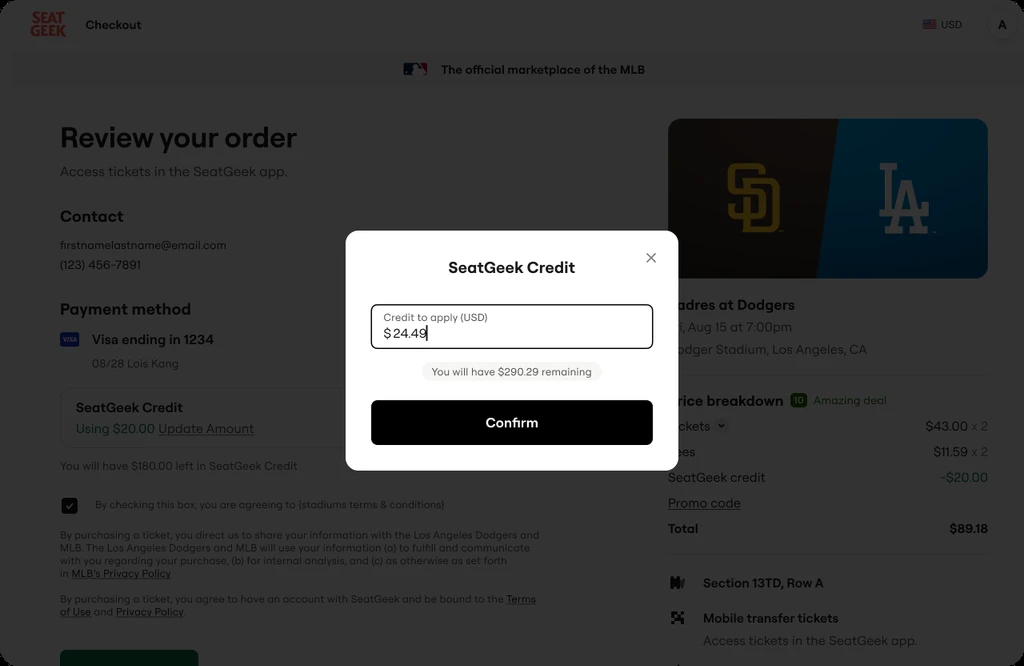
Select Edit or Update Amount to choose how much credit to apply.
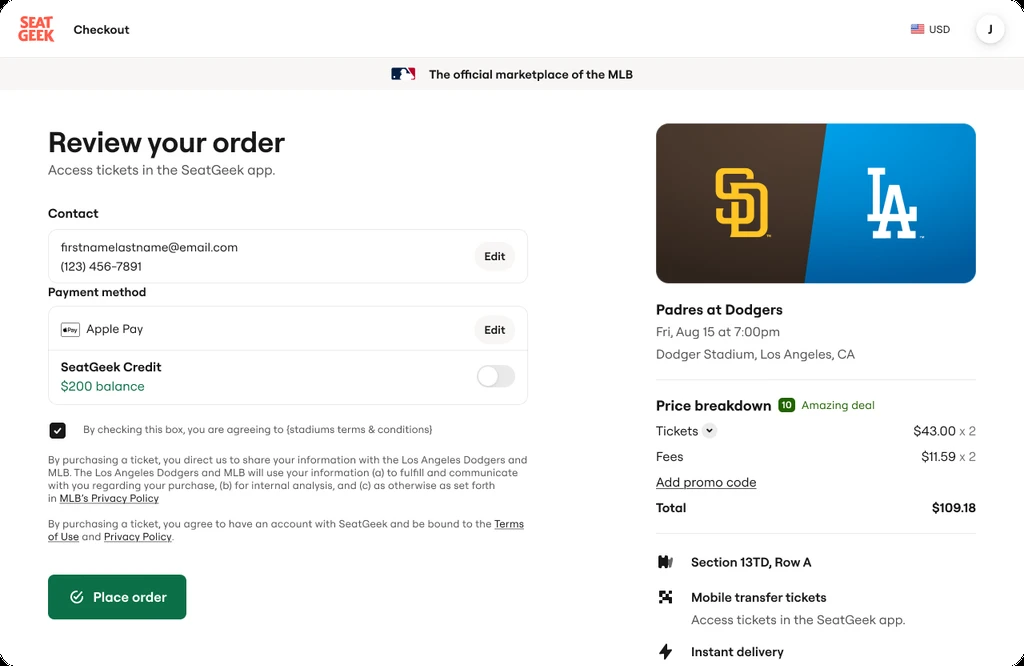
Turn the SeatGeek Credit toggle off if you do not want to use it for the order.
Where can I find my SeatGeek Credit balance?
Sign in to your SeatGeek account and open the account menu. Your available SeatGeek Credit balance will appear in the navigation menu and on your Account page.
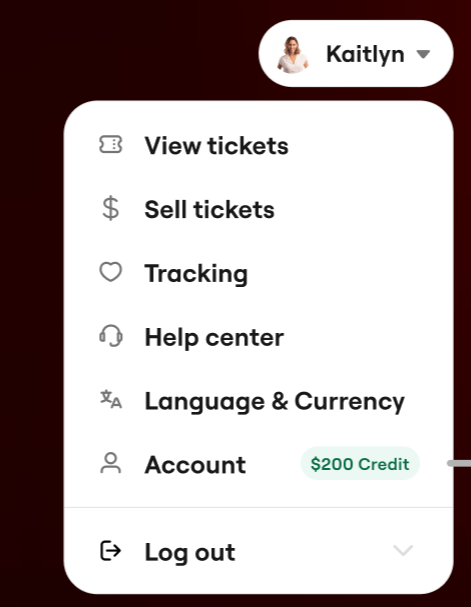
Your available credit may appear beside Account in the account menu.
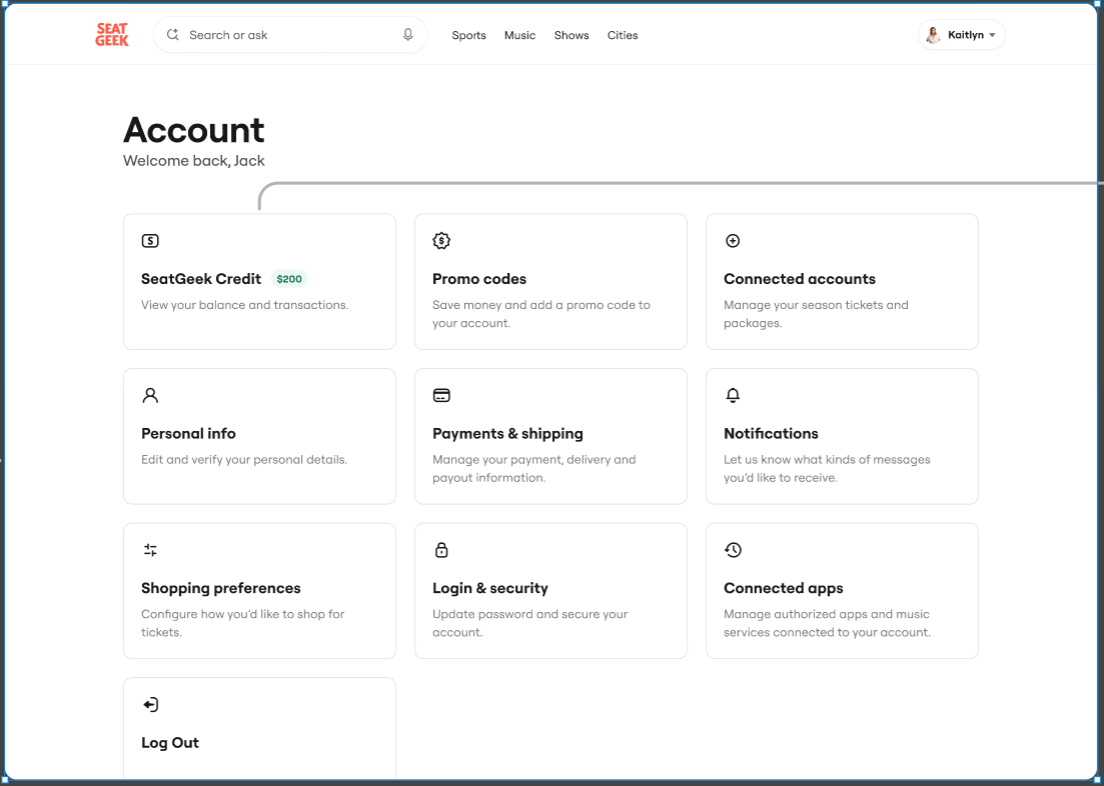
You can also select SeatGeek Credit from your Account page to view your balance and transactions.
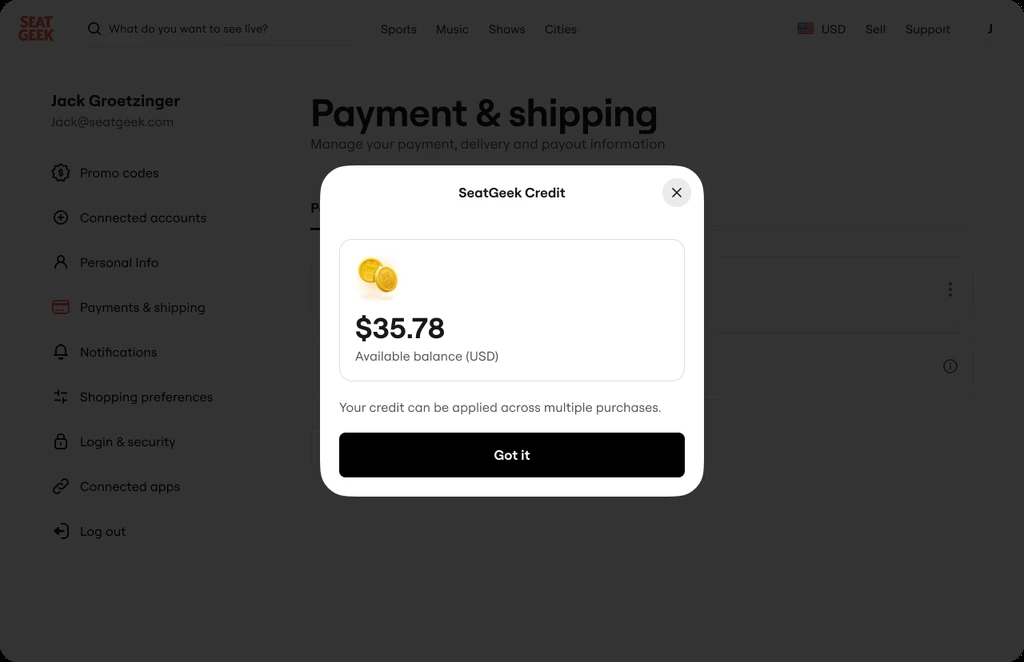
Open your SeatGeek Credit details to see your available balance.
Why is my SeatGeek Credit not appearing?
SeatGeek Credit is only shown at checkout when the purchase is eligible for SeatGeek Credit. Other requirements are:
- SeatGeek Credit cannot currently be applied through team or partner Account Managers
- SeatGeek Credit can only be used on orders purchased in U.S. dollars (USD)
- SeatGeek Credit cannot be used for orders that are purchased with the Cancel For Any Reason (CFAR) service added on
- SeatGeek Credit cannot be combined with Account Credit from an Account Manager
- Some inventory may not eligible to be purchased with SeatGeek Credit. This includes, but is not limited to:
- packages (ex. VIP, specialty, fan club...etc)
- season tickets
- multi-day event tickets
If you believe your order should be eligible to be purchased with SeatGeek Credit, but you still do not see the ability to apply it at checkout, confirm that you are signed in to the account holding the credit and that you are using SeatGeek's standard checkout for a USD order. If the option still does not appear, contact SeatGeek Support for more help.
What you can and cannot do with your SeatGeek Credit
| You can | You cannot |
|---|
| Use all or part of your balance | Transfer credit to another account |
| Keep the unused balance for later | Purchase SeatGeek Credit |
| Combine it with eligible payment methods | Convert a promo code into SeatGeek Credit |
| Combine it with an eligible promo code | Cash it out through self-service |
What happens to my SeatGeek Credit if the event I used it on is canceled?
If an eligible refund is issued for an order paid with SeatGeek Credit, the amount originally paid with credit is returned as SeatGeek Credit.
- SeatGeek Credit only: The eligible refund is returned as SeatGeek Credit.
- SeatGeek Credit plus another payment method: The eligible refund is returned proportionally to the original payment methods.
- Another payment method only: The refund follows the policy that applies to that order and event.
For many eligible canceled events, SeatGeek Credit may be offered as the default refund method. If your order is eligible for a cash refund, you may be able to change your preference during the applicable refund window, as long as none of the issued credit has been used.
Need help with a partial refund or an unexpected result? Contact SeatGeek Support so we can review your order.
Does SeatGeek Credit expire?
It depends on how the credit was issued:
- Most refund-issued SeatGeek Credit does not expire.
- Promotional or bonus credit may have an expiration date.
- If an order paid with expiring credit is refunded, the returned credit may keep its original expiration date. If that date is fewer than 90 days away, the returned credit will receive a new 90-day expiration period.
You can check the details shown with your balance to confirm whether your credit expires.
What is the difference between SeatGeek Credit and Account Credit?
SeatGeek Credit is used for eligible purchases in SeatGeek's standard marketplace checkout. Account Credit is used within Account Manager for eligible partner team, venue, and league inventory. The two balances are separate and cannot be combined in the same order.
FAQs
Can I purchase SeatGeek Credit?
No. SeatGeek Credit is not currently available for purchase.
Can I transfer SeatGeek Credit to someone else?
No. SeatGeek Credit stays within the SeatGeek account where it was issued.
Can I use a promo code with my SeatGeek Credit?
Yes, you can combine SeatGeek Credit with an eligible promo code.
Can I use another payment method with my SeatGeek Credit?
Yes. If your credit does not cover the full eligible order, you can use another supported payment method for the remaining amount.
Can I use my SeatGeek Credit to purchase tickets on the SeatGeek app?
Yes! Both the iOS and Android versions of the SeatGeek app support the use of SeatGeek Credit at checkout.
Can SeatGeek Credit be refunded in cash?
No. SeatGeek Credit is returned as SeatGeek Credit when an eligible refund is issued.